-
Resources
- Forums
-

Foglight for SQL Server
Proactively tune your SQL Server databases for more uptime and better
performance. With Foglight® for SQL Server, you can quickly
diagnose and resolve SQL Server performance problems and optimize your
workloads to prevent future issues. This SQL Server tuning tool includes
real-time and historical diagnostics, reporting and more, so you can
confidently ensure the health of your entire database environment.
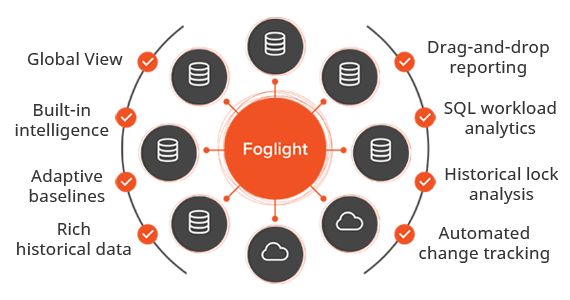
Ensure SQL Server health with real-time diagnostics, SQL Server performance tuning and more
Your SQL Server environment continues to grow and you’re working harder than ever to improve SQL Server performance. But you can’t fix what you can’t see. Once a SQL Server performance problem occurs, you’re already in reactive mode, spending time fixing issues instead of innovating and preventing problems. But what if you had a better SQL Server performance monitor? Switching from subpar SQL Server tuning tools to a more powerful, all-inclusive solution would enable you to proactively manage SQL Server health.
Key benefits
Global view
See critical issues across platforms and take immediate action to improve SQL Server performance.
Built-in intelligence
Understand health and activity at a glance. Get pop-up advice with workflows. Simplify SQL Server performance tuning.
Adaptive baselines
Receive alerts when activity deviates from normal metrics.
Rich historical data
Resolve SQL Server performance issues through diagnostics and alarm data from any drilldown screen.
Drag-and-drop reporting
Use data you have collected to develop customized views and reports.
SQL workload analytics
Investigate workload by drilling into data on users, programs, SQL and sessions.
Historical lock analysis
Resolve concurrency issues with historical reviews of blocking-lock scenarios.
Automated change tracking
See changes to server, instance, database and schema environments and SQL degradations.
Reduce mean time to resolution
With Query Insights, you can easily narrow the scope of analysis and quickly pinpoint queries causing issues.
Supported platforms
No matter which database platforms you use, Foglight can help you monitor,
predict, diagnose and resolve database performance issues quickly. Foglight
offers comprehensive support for cloud databases - including: Amazon RDS, Azure
SQL DB (single/elastic pools), Azure SQL Managed Instance and more.
Foglight solves common DBA Challenges
68%
MANAGE MULTIPLE PLATFORMS
72%
PERFORMANCE #1 RESPONSIBILITY
75%
IMPROVED RESOLUTION TIME
Features
Comparison reporting
Identify the root cause of a performance deviation in your application environment.
Wait-event analysis
View wait-event data at the statement level to resolve resource-related performance problems.
Automatic instance discovery
Rapidly deploy through automated discovery of instances and specific hosts.
Alarm workflow
Search for past solutions, set up blackouts and manage your alarms.
Easy integration
Integrate your other end-to-end enterprise monitors seamlessly.
Wait-state analysis
Determine the location and cause of waits by diagnosing your wait statistics.
Wizard-driven installation
You can easily add database monitoring to your infrastructure or configure as a standalone solution.
Powerful performance investigation
Proactively optimize performance with an analytics engine that collects and investigates data on baselines, lock analysis and change tracking.
Tour
Overview
View the complete instance health status in a single view.
Specification
Specifications
- 2005 through 2019
- Amazon:
- IaaS -EC2 - *Windows and Linux
- SQL Server RDS
- Azure
- IaaS - *Windows and Linux
- Azure SQL Managed Instance
- Azure SQL DB (Single/elastic pools)
Both on-premises and cloud deployments - including:
- All Operating systems supported by Microsoft.
- US English
Resources
Foglight for SQL Server Overview
Gain complete visibility into your SQL Server environment with Foglight for SQL Server.
Accelerate Database Efficiency with SQL Performance Investigator
Solve performance issues faster with deep SQL workload visibility and lock analytics
A Zombie's Survival Guide in a Changing Database World
With the rise of autonomous databases – and all the other scary changes in database management systems – you, as a DBA may be w...
DBA vs. Memory Settings
SQL Server memory pressure: What is it and how does it affect SQL Server?
The Importance of Continuous Monitoring in a DevOps Pipeline
A common challenge in many IT teams is the “blame game” where developers blame DBAs for stability and performance issues and v...
Managing Cross-Platform Database Environments
This technical brief outlines the top five complications faced by DBAs amid the rush of new database technologies in recent yea...
DBAs Face New Challenges: Trends in Database Administration
To gain insight into the evolving challenges for DBAs, Quest commissioned DBTA to survey DBAs and those responsible for the man...
The Fundamental Guide to SQL Query Optimization
5 tips, using copy-and-paste SQL Server examples, to improve SQL Server performance.