-
Resources
- Forums
-

Recovery Manager for Exchange
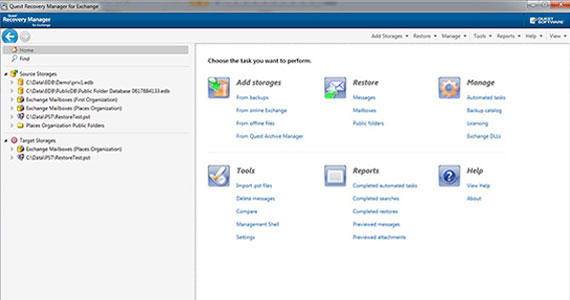
Key Benefits
Federated search
Intelligent search
Comparison reporting
Migration support
Task automation
Export options
Backup software
Single interface. Multiple data sources
Comprehensive data search
Specifications
Before installing Recovery Manager for Exchange 5.8.5, ensure that your system meets the following minimum hardware and software requirements.
- Core Components (required)
- Management Shell (optional)
- Web Interface (optional)
This section provides system requirements for installing and running each of these components.
- Processor
1.4 GHz or faster Pentium or equivalent, x86 or x64 architecture.
- Overall Memory (RAM)
512 MB or more recommended.
- Hard disk space
- x86 system
- Full product installation, including the prerequisite software: 1.5 Gb of free disk space
- Product installation when all the prerequisite software is already installed: 75 Mb of free disk space
- x64 system
- Full product installation, including the prerequisite software: 1.5 Gb of free disk space
- Product installation when all the prerequisite software is already installed: 110 Mb of free disk space
- x86 system
- Operating system
Your computer must run one of the following operating systems (32-bit or 64-bit edition):
- Microsoft Windows Server 2019
- Microsoft Windows Server 2016
- Microsoft Windows 10 without Service Pack
- Microsoft Windows 8.1 without Service Pack
- Microsoft Windows 8 without Service Pack
- Microsoft Windows Server 2012 R2 without Service Pack
- Microsoft Windows Server 2012 without Service Pack
- Microsoft Windows 7 without Service Pack or with Service Pack 1
- Microsoft Windows Server 2008 R2 without Service Pack or with Service Pack 1
- Microsoft Windows Server 2008 with Service Pack 1 or Service Pack 2
- Microsoft Windows Vista with Service Pack 2
NOTE: Recovery Manager for Exchange does not support Terminal Services Application mode.
- Screen resolution
1024 x 768 or higher
- Microsoft .NET Framework
- Microsoft .NET Framework 4.0
- Microsoft .NET Framework 2.0
The latter is only required if the computer on which you plan to use Recovery Manager is running one of these operating systems:
- Microsoft Windows Server 2003 with Service Pack 2
- Microsoft Windows XP with Service Pack 3 (32-bit edition only)
- Microsoft SQL Server
One of the following versions is required:
- Microsoft SQL Server 2019 (Enterprise, Standard, Workgroup, Express, Web, or Developer Edition)
- Microsoft SQL Server 2017 (Enterprise, Standard, Workgroup, Express, Web, or Developer Edition)
- Microsoft SQL Server 2016 (Enterprise, Standard, Workgroup, Express, Web, or Developer Edition)
- Microsoft SQL Server 2014 (Enterprise, Standard, Workgroup, Express, Web, or Developer Edition)
- Microsoft SQL Server 2012, with or without any Service Pack (Enterprise, Standard, Workgroup, Express, Web, or Developer Edition)
- Microsoft SQL Server 2008 R2, with or without any Service Pack (Enterprise, Standard, Workgroup, Express, Web, or Developer Edition)
- Microsoft SQL Server 2008, with or without any Service Pack (Enterprise, Standard, Workgroup, Express, Web, or Developer Edition)
- Microsoft SQL Server 2005, with or without any Service Pack (Enterprise, Standard, Workgroup, Express, Web, or Developer Edition)
- Microsoft Windows PowerShell
Microsoft Windows PowerShell 2.0
- Microsoft Windows Installer
Microsoft Windows Installer 4.5
- Microsoft Outlook
Your computer must have one of the following versions installed:
- Microsoft Outlook 2016 (standalone installation)
- Microsoft Outlook 2013
- Microsoft Outlook 2010
- Microsoft Outlook 2007 SP2 or later
- Microsoft Outlook 2003
NOTE: Microsoft Outlook 2003 does not support Office 365. If you plan to use Recovery Manager for Exchange for working with data in Office 365, install Microsoft Outlook 2007 or later.
- Microsoft Exchange Server
Supported versions of Microsoft Exchange Server:
- Exchange Server 2019 CU 2, CU3, CU4, CU5, CU6
- Exchange Server 2016 CU5, CU12, CU13, CU14, CU15, CU16, CU17
- Exchange Server 2016 without service pack
- Exchange Server 2013 CU22, CU23
- Exchange Server 2013 without Service Pack or with Service Pack 1(offline Exchange Server 2013 databases are only supported when Recovery Manager for Exchange is installed on a computer running Windows Vista with Service Pack 2 or a later version of Windows)
- Exchange Server 2010 without Service Pack or with SP1, SP2, or SP3
- Exchange Server 2007 without SP or with SP1, SP2, or SP3
NOTE:
- Recovery Manager for Exchange does not support Exchange Cached Mode. Before you start working with an online Exchange Server (for example, before registering Exchange mailboxes as storages), make sure that Exchange Server allows connections in non-Cached Exchange Mode.
- To work with Exchange Server databases, Recovery Manager for Exchange requires several .dll files supplied with Microsoft Exchange Server. For detailed information about these files, see the Recovery Manager for Exchange User Guide.
- To link Recovery Manager for Exchange to the required .dll files originating from Exchange Server 2013, 2010, 2007 or 2016 you must install Recovery Manager for Exchange on a computer running a 64- bit edition of Windows.
- IBM Lotus Notes
In order to view, search, and restore Lotus Domino data with Recovery Manager for Exchange, your computer must have one of the following IBM Lotus Notes versions installed: 9.0, 8.5, 8.0, or 7.0
- IBM Lotus Domino
Recovery Manager for Exchange supports the following versions of IBM Lotus Domino: 9.0, 8.5, 8.0, 7.0, 6.5, 6.0, 5.0, and 4.6
- Archive Manager
Recovery Manager for Exchange supports the following versions of Archive Manager as source and target storage: 5.4, 5.5, 5.6,5.3, 5.2 and 5.0.
- Recovery Manager for Active Directory
Recovery Manager for Exchange can integrate with Recovery Manager for Active Directory to restore mailbox user accounts from Active Directory backups. Recovery Manager for Exchange and Recovery Manager for Active Directory must be installed on the same computer.
- Recovery Manager for Exchange components
Core Components
- Microsoft Internet Information Server (IIS)
Microsoft Internet Information Services (IIS) 6.0, 7.0, 7.5, 8.0, or 8.5 must be installed on the Recovery Manager for Exchange computer.
IMPORTANT: On Windows Server 2003 or earlier, IIS must be running in the 32-bit mode. If your IIS is running in the 64-bit mode, the Recovery Manager for Exchange Setup configures it to run in the 32-mode. As a result, other applications using your IIS may stop functioning properly.
- Microsoft Silverlight
Microsoft Silverlight 5 must be installed on the computer from which you want to access the Web Interface. If Silverlight is not installed, you will be prompted to install it when accessing the Web Interface for the first time.
- Web browser
You can access the Web Interface by using Microsoft Internet Explorer 7.0 or later
- Required Recovery Manager components
Core Components
Recovery Manager for Exchange 5.8.5 is upgradeable from version 5.6 or later.
Recovery Manager for Exchange can integrate with the below-listed backup software to extract and register Exchange Server databases from streaming (normal, incremental, and differential) backups created with these products. The next table also describes the conditions where Recovery Manager for Exchange can extract and register Exchange Server databases from VSS (Volume Shadow Copy Snapshot) backups created with particular backup software.
Supported backup software
Backup software
Version
VSS backups
Quest Rapid Recovery(legacy name: AppAssure)
5.3, 5.4, 6.0, 6.1.3, 6.2, 6.2.1, 6.3, 6.4
Not applicable
Quest NetVault Backup
8.6, 9.0, 9.1, 9.2, 10, 11, 11.1, 11.4, 11.4.5, 12, 12.0.1, 12.1, 12.2, 12.3, 12.4
VSS backups are supported via Exchange emulation if these conditions are true:
- Backed Exchange is Exchange Server 2007, Exchange Server 2010 or Exchange Server 2013.
- Recovery Manager for Exchange computer is running the same or a later version of Windows as the backed up Exchange Server.
Quest vRanger (Standard and Pro)
5.3, 5.4, 5.5, 6.0, 6.1, 7.0, 7.1, 7.2, 7.3, 7.5, 7.5.1, 7.6.3, 7.6.5, 7.6.6, 7.7
Not applicable
CA BrightStor ARCserve (also known as CA ARCServeIT for Windows NT and CA BrightStor Enterprise Backup)
2000 (7.0), 9.0, 10.5, 11.0, 11.1, 11.1 SP1, 11.5, 11.5 SP1, 11.5 SP3, 11.5 SP4, 12.0, 12.0 SP1, 12.0 SP2, 12.5, 12.5 SP1, 15.0, 16.0, 16.0 SP1, 16.5
VSS backups are supported via Exchange emulation if these conditions are true:
- Created with ARCserve Backup 11.5 SP4, 12.0, 12.0 SP1, 12.0 SP2, 12.5, 12.5 SP1, 15.0, 16.0, 16.0 SP1, or 16.5.
- Recovery Manager for Exchange computer is running the same or a later version of Windows as the backed up Exchange Server.
HP Data Protector
5.1, 5.5, 6.0, 6.1, 6.2, 7.0, 8.0, 8.1, 9.0
VSS backups are supported via Exchange emulation if these conditions are true:
- Created with HP Data Protector 7.0, 8.0, 8.1 or 9.0.
- Recovery Manager for Exchange computer is running the same version of Windows as the backed up Exchange Server
IBM Tivoli Storage Manager
5.1.1, 5.1.5, 5.2, 5.3, 5.4, 5.5, 6.1, 6.2, 6.3, 6.4, 7.1, 7.1.4
VSS backups are supported via Exchange Emulation if these conditions are true:
- Created with Tivoli Storage Manager 6.2, 6.3, 6.4, 7.1 or 7.1.4
- Backed up Exchange Server version is Exchange Server 2007, Exchange Server 2010, or Exchange Server 2013.
- Recovery Manager for Exchange computer is running the same or a later version of Windows as the backed up Exchange Server.
EMC NetWorker
6.0, 6.1, 6.2, 7.0, 7.1, 7.2, 7.3, 7.4, 7.5, 7.6, 8.0, 8.1, 8.2, 9.0, 9.1.1, 9.2.1
VSS backups are supported via Exchange emulation if these conditions are true:
- Backed up Exchange Server version is Exchange Server 2007, Exchange Server 2010, or Exchange Server 2013.
- Recovery Manager for Exchange computer is running the same or a later version of Windows as the backed up Exchange Server.
Microsoft Windows Server Backup
Windows NT 4.0, Windows 2000, Windows Server 2000
VSS backups are not supported.
Microsoft Windows Server Backup
Windows Server 2008, Windows Server 2008 R2, Windows Server 2012, Windows Server 2016
VSS backups are supported via access to backup server.
Microsoft System Center Data Protection Manager
2007, 2007 with Feature Pack, 2007 SP1, 2010, 2012, 2012 SP1, 2012 R2
VSS backups are supported via access to backup server.
Symantec Backup Exec for Windows Servers
8.6, 8.6 SBS, 8.6 for WSA, 9.0, 9.1, 10.0, 10d (10.1), 11d, 12.0, 12.5, 2010 (13), 2010 SP1, 2010 R2, 2010 R2 SP1, 2010 R3, 2010 R3 SP1, 2010 R3 SP3, 2012, 2012 SP1, 2012 SP2, 2012 SP3, 2012 SP4, 2014
NOTE: Granular Restore Technology (GRT) backups are not supported.
VSS backups are supported via direct access if created with Backup Exec 11d, 12.0, 12.5, 2010 (13), 2010 SP1, 2010 R2, 2010 R2 SP1, 2010 R3, 2010 R3 SP1, 2010 R3
- VSS backups are supported via Exchange emulation if these conditions are true: Created with Backup Exec 11d, 12.0, 12.5, 2010 (13), 2010 SP1, 2010 R2, 2010 R2 SP1, 2010 R3, 2010 R3 SP1, 2010 R3 SP3, 2012, 2012 SP1, or 2012 SP2
- Backed up Exchange Server version is Exchange Server 2007, Exchange Server 2010, or Exchange Server 2013.
- Recovery Manager for Exchange computer is running the same version of Windows as the backed up Exchange Server.
NOTE: Recovery Manager for Exchange can register offline Exchange Server databases extracted from a snapshot backup with Backup Exec. For instructions, see the Recovery Manager for Exchange User Guide.
Symantec NetBackup
NetBackup DataCenter 4.0 V, 4.5, 4.5 FP3, 4.5 FP4, 4.5 FP5, 4.5 FP6, 4.5 FP7, 4.5 FP8, 4.5 FP9, 4.5 MP1, 4.5 MP2, 4.5 MP3, 4.5 MP4, 4.5 MP5, 4.5 MP6, 4.5 MP7, 4.5 MP8, 4.5 MP9
VSS backups are notsupported.
NetBackup BusinesServer 4.5, 4.5 FP3, 4.5 FP4, 4.5 FP5, 4.5 FP6, 4.5 FP7, 4.5 FP8, 4.5 FP9, 4.5 MP1, 4.5 MP2, 4.5 MP3, 4.5 MP4, 4.5 MP5, 4.5 MP6, 4.5 MP7, 4.5 MP8, 4.5 MP9
VSS backups are not supported.
NetBackup Server or NetBackup Enterprise Server 5.0, 5.0 MP1, 5.0 MP2, 5.0 MP3, 5.0 MP4, 5.0 MP5, 5.0 MP6, 5.0 MP7, 5.1, 5.1 MP1, 5.1 MP2, 5.1 MP3, 5.1 MP4, 5.1 MP5, 5.1 MP6, 6.0, 6.0 MP1, 6.0 MP2, 6.0 MP3, 6.0 MP4, 6.0 MP5, 6.0 MP6, 6.0 MP7, 6.5.0, 6.5.1, 6.5.2, 6.5.3, 6.5.4, 6.5.5, 6.5.6, 7.0.0, 7.0.1, 7.1.0, 7.5.0, 7.6.0, 7.7.0
7.5.0, 7.6.0 or 7.7.0.
VSS backups are supported via Exchange emulation if these conditions are true:
- Created with NetBackup 6.5.2, 6.5.3, 6.5.4, 6.5.5, 6.5.6, 7.0.0, 7.0.1, 7.1.0, 7.5.0, 7.6.0 or 7.7.0
- Backed up Exchange Server version is Exchange Server 2007, Exchange Server 2010, or Exchange Server 2013
- Recovery Manager for Exchange computer is running the same version of Windows as the backed up Exchange Server.