产品演示
观看演示短片,了解Space Manager with LiveReorg®将如何显著改善数据库的性能。
观看演示 »
Quest社区
与专家交流,讨论最新热点,帮助策划您感兴趣的产品等等!
立即加入 »
技术简报
了解Space Manager with LiveReorg®如何在对数据进行归档后改善用于SAP应用程序的Oracle数据库性能。
马上阅读 »
白皮书
借助于本期Quest白皮书,以专业的眼光更深入地了解Oracle 11g的分区性能。
马上阅读 »

Space Manager with LiveReorg

在Oracle数据库中优化输入、输出和磁盘利用率

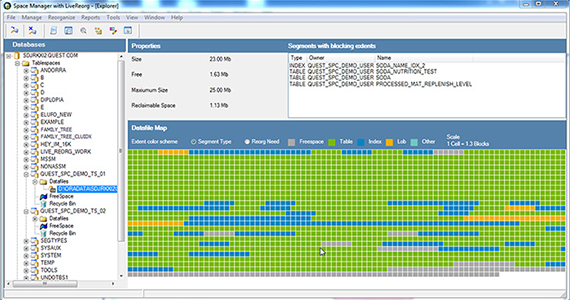
Oracle整理数据库容量优化以及确保最佳性能方面,Quest推出的Space Manager with LiveReorg®可谓优势独具。 它可让您进行在线整理,回收磁盘空间,并防止应用程序和数据库发生故障。 不过,它改进性能的能力还远不止于此。 对于因Oracle数据归档产生的碎片而造成的性能问题,Space Manager的解决能力同样惊人。此项功能对于SAP、Siebel以及Oracle E-Business等关键的ERP业务应用软件而言尤其重要。此类软件由于处理量大,因此需要定期对数据进行归档。

空间回收与整理

  • 避免购买不必要的磁盘空间。 对定期归档的表单进行整理,以回收浪费的空间,并优化性能。
  • 进行在线整理,防止应用程序和数据库发生故障。
  • 确定要整理的表单和索引列表。 最大程度地回收空间及跟踪历史整理活动,主动进行分析和规划。
  • 支持多个对象和数据类型的实时标准整理,包括域索引、个别分区、带有LONG数据列和LOB数据类型的表单以及由用户定义的数据类型。
  • 针对整理失败的脚本提供重启和清理功能,并自动从故障点恢复执行脚本或清理残留对象,因此您无需再做无谓的推测。

容量监控

  • 查看简易图表,快速显示当前的空间使用状态以及共享存储资源的数据库在未来的增长趋势。
  • 根据历史或“假定”的增长率趋势分析图表,预测未来的空间需求。
  • 提醒您注意即将出现的问题(例如表空间的可用空间变小)以及回收空间的可能性,以便更有效地利用空间。

分区

  • 进行实时分区,减少停机故障。 在应用程序和用户都在线时,使用内置的分区向导对对象进行分区。
  • 获得灵活的分区选择。 通过分区、再分区和添加、修改或删除分区,确定访问数据的最佳匹配对象。
  • 利用空间审核,确保整理成功。 多重自动空间检查审核,以验证是否有足够的空间可供计划中的整理任务顺利执行。

Before installing Space Manager and Capacity Manager, ensure that your system meets the following minimum hardware and software requirements.

Requirements for the Client Computer

The Space Manager and Capacity Manager clients must be installed on the same computer, and their requirements are the same unless otherwise specified. The computer must meet the following requirements:

Oracle Client

Supported by both Space Manager and Capacity Manager:

  • Oracle SQL*Net version 2.1 minimum (32-bit)
  • Oracle Net version 9.2, 10g, and 11g

Space Manager also supports Oracle Net 8.1.7. Capacity Manager also supports Instant Client.

Operating System

Supported by both Space Manager and Capacity Manager:

  • Windows Server 2003
  • Windows XP
  • Windows Vista (FDCC compliant)
  • Windows Server 2008
  • Windows 7
  • Citrix Metaframe XP
ProcessorPentium IV Processor
Memory512 MB of RAM minimum; 1 GB recommended
Display SettingsA resolution of 1024 x 768; true color or high color; small fonts
Disk Space

Space Manager: Approximately 600 MB

Capacity Manager: Approximately 13 MB

.NET FrameworkMicrosoft .NET Framework 2.0

Requirements for Databases

Each database being managed with Space Manager must meet the following requirements:

Oracle Database

Supported by both Capacity and Space Manager:

  • Oracle 9.2
  • Oracle 10.2
  • Oracle 11g
  • Oracle 11g R2

Note: Space Manager supports Oracle Enterprise Edition and Standard Edition databases.

Database Server Operating System

Space Manager supports the following operating systems:

  • HP-UX 11 and 11i on PA_RISC
  • HP-UX 11i on Itanium
  • Sun Solaris 2.8, 2.9, and 10
  • IBM AIX Version 5.1, 5.2, 5.3, and 6.1
  • Red Hat Linux Advanced Server 3.0, 4.0, and 5.1
  • Oracle Linux 4 and 5
  • Oracle Linux 5 with Unbreakable Enterprise Kernel
  • SuSE Linux Enterprise Server 9 and 10
  • Windows 2000 Server and Windows Server 2003 and 2008

Note: When using Oracle 11.1 or earlier on 64-bit systems, the installing user must be configured to use the Oracle 32-bit client libraries. For Oracle 11.2 or later on 64-bit systems, the installing user can use the Oracle 64-bit client libraries.

Disk Space

Disk-space requirements are:

  • 80 MB for statistics tables
  • 20 MB for scripts tables
  • 20 MB contiguous free space for LiveReorg objects in the LiveReorg tablespace (set with QSA’s LW_TABLESPACE parameter)
  • 40 MB in the filesystem for QSA executables and logs
Oracle Packages

Space Manager: DBMS_SQL, DBMS_PIPE, DBMS_LOCK, DBMS_SPACE_ADMIN

QSA: DBMS_SQL, DBMS_PIPE, DBMS_OUTPUT, DBMS_APPLICATION_INFO

Find Long LONGs feature: UTL_RAW

Email notifications: UTL_SMTP

Oracle's Partitioning Option

Required for the Online Switch (a feature available for live reorganizations) and the Partitioning Wizard; Partitioning Option must be installed and licensed.

XDB Schema

Required for XMLType datatypes.

Requirements for the Capacity Manager Repository

The database used for the Capacity Manager repository must meet the following requirements:

Oracle Database

Supported for the repository:

  • Oracle 9.2
  • Oracle 10.2
  • Oracle 11g
  • Oracle 11g R2
Disk Space

8 MB recommended per monitored database assigned to a repository (accommodates one year of growth in repository objects)

Job Scheduler

One of the following schedules is needed for snapshot jobs, report scheduling, and Windows scheduling:

  • Oracle DBMS_JOBs is used for scheduling snapshot jobs on Oracle8i and Oracle9i.
  • Oracle DBMS_SCHEDULER is used for scheduling snapshot jobs on Oracle10g.
  • A third-party job scheduler can be used instead of an Oracle DBMS package.
Oracle Initialization Parameters

Oracle initialization parameters should be set as follows:

  • OPEN_LINKS—The value for OPEN_LINKS initialization parameter should be equal to or greater than the number of monitored databases assigned to a repository. The default value for this parameter is 4; the maximum is 255.
  • JOB_QUEUE_PROCESSES—The value for the JOB_QUEUE_PROCESSES initialization parameter should be greater than zero in Oracle 9.2 databases. For optimal performance of snapshot jobs, it should be equal to or greater than the number of monitored databases assigned to a repository. The maximum is 1,000.
Character Set

Must be a superset of the character sets for all monitored databases. A UTF8 character set is recommended.

Activity Level

Light activity level.


Language Supported:

  • US English