-
Resources
- Forums
-

Active Administrator for Active Directory Health
Use this Active Directory health check tool to ensure IT fitness. Diagnose Active Directory health and performance in real time. Active Administrator for Active Directory Health is a set of Active Directory monitoring tools that offers troubleshooting, diagnostics and monitoring of AD performance to maintain user productivity. This set of Active Directory monitoring tools delivers real-time diagnostic data from a centralized AD health dashboard, helping you pinpoint the root cause of AD problems before they impact users. Additionally, whatever AD changes you make as a result of the AD health check can be synced accurately and efficiently to Azure AD.
 08:34
08:34
Issues with Microsoft Active Directory can have wide-reaching effects, including system downtime, directory unavailability and end-user disruption. Yet because administrators have no easy way to run AD health checks or identify resource bottlenecks, they spend too much time troubleshooting and resolving problems in AD. But Active Administrator for Active Director Health simplifies the process significantly. Use this set of Active Directory monitoring tools today to improve the health and performance of AD.
Network Operations Center
Get a centralized location to monitor data points, active alerts and detailed information on each domain.
AD server performance reports
Proactively report on daily performance metrics with customizable intelligent analyses based on your environment.
Live AD topology view
View the entire AD site to see an entire forest at a glance, view issues on domain controllers and automate AD performance troubleshooting.
49%
Achieved ROI in 6 – 12 months
73%
Security & auditing #1 feature
5 Star
Rating for “Delegation” feature
Features
Centralized diagnostics console
Discover the flow of data from the network through a domain controller using visual flow charts, graphs and icons. This set of Active Directory monitoring tools offers a consolidated view of system status, with resource bottlenecks highlighted in yellow and red so you can drill down on alerts for further analysis.
Network Operations Center (NOC) view
Network Operations Center (NOC) view gives you a central location where you can monitor your forests, domains, sites and domain controllers. View a summary of data points, active alerts and detailed information on each domain. Set up unique profiles to view only the specific data you need. This set of Active Directory monitoring tools also enables you to create topology diagrams for a visual representation of your network.
Simplified AD health analysis
Proactively monitor and diagnose critical, directory-wide infrastructure issues from replication latency to Domain Name System (DNS) inconsistencies. When a problem occurs, this set of Active Directory monitoring tools sends an alert notifying you immediately of the exact nature and location of the problem, saving you analysis and troubleshooting time. Following critical alerts, built-in or custom remediation actions run automatically to fix the problem.
Streamlined enterprise-wide troubleshooting
Diagnose directory problems without server-by-server, test-by-test troubleshooting using a comprehensive set of troubleshooting tests and utilities. Proactively isolate and repair problems to ensure domain controller, DNS and replication health. You can also get detailed reports for current use and historical reference.
Automated AD health checks and repairs
Rid yourself of manual AD trouble-shooting with more than 100 customizable AD health check tests, including replication failure, queue length, DNS zone and SYSVOL consistency. This set of Active Directory monitoring tools allows you to run multiple tests against selected domain controllers, sites, domains or naming contexts.
DNS management
Proactively manage, monitor and alert on DNS server health with free access to Active Administrator for DNS Management. Enable your IT administrators to proactively manage, monitor and alert on Domain Name Server health and availability from a single, easy-to-use console.
Custom services and performance counters alerts
In addition to AD health check capabilities, Active Administrator for Active Directory Health allows you to self-select additional Windows services and performance counters that are required to be monitored, so you can identify the root cause of problems before they impact users.
Product Add-ons
Active Administrator
Go beyond AD health check capabilities by expanding with Active Administrator, which helps you address administration gaps left by native tools and quickly meet auditing requirements and security needs. With integrated AD administration and seamless permissions management, you can maintain business continuity, increase IT efficiency and minimize security risks – all from a single console.
Active Administrator for Certificate Management
Enhance AD health check capabilities with Active Administrator for Certificate Management, providing complete digital certificate lifecycle management from a single console. It helps prevent security breaches and maintain customer confidence by ensuring that encrypted communications and transactions remain secure.
Active Administrator for DNS Management
Expand this set of Active Directory monitoring tools with a free module enabling IT administrators to proactively manage, monitor and alert on Domain Name Server health and availability from a single, easy-to-use console, ensuring the availability of DNS services and access to critical corporate applications.
Tour
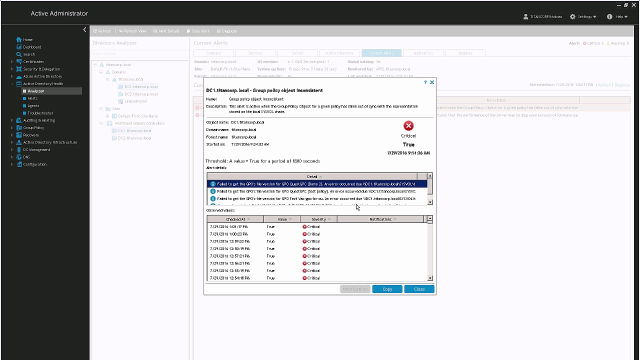
AD health dashboard
Quickly view AD health, identify bottlenecks and get details with this Active Directory health check tool.
Specifications
- Processor
1 GHz Pentium
- Disk Space
100 MB
- Memory (RAM)
- For Windows Server 2012, 1 GB minimum, 2 GB recommended
- For Windows Server 2012 R2, 1 GB minimum, 2 GB recommended
- For Windows Server 2016, 1 GB minimum, 2 GB recommended
- For Windows Server 2019: 1 GB minimum, 2 GB recommended
- Operating systems
- Windows Server 2012
- Windows Server 2012 R2
- Windows Server 2016
- Windows Server 2019
- Server installation
- Group Policy Management Console (GPMC)
- Microsoft SQL Server 2012, 2014, 2016, 2017, 2019
- Microsoft SQL Express 2012, 2014
- .Net Framework v.4.7.2
- Processor
1 GHz Pentium
- Disk Space
100 MB
- Memory
256 MB
- Operating systems
- Windows 8.1
- Windows 10
- Windows Server 2012
- Windows Server 2012 R2
- Windows Server 2016
- Windows Server 2019
See the Release Notes for the full list of system requirements.
Resources
Active Administrator for Active Directory Health
Simplified Active Directory management from a single console
Overview of Active Administrator for Active Directory Health
In this video you'll see an overview for Active Administrator for Active Directory Health, the solution from Quest that ensures...
Keeping Active Directory Healthy and Fine-Tuned
What’s the best way to go about keeping your AD healthy? In this white paper, read about the critical components and services t...
Managing the economic and operational costs of Active Directory
Explore what it takes to be both economically and operationally efficient in Active Directory management, plus, learn how to av...
Active Directory Management Simplified
Mastering Active Directory management is critical for effectively handling the security and uptime of a Windows network. Organi...
14 Ways to More Secure and Efficient Active Directory Administration
If you’re exploring options to make your Active Directory administration more secure and efficient, this paper provides 14 ways...
How to implement NIST, ESAE and Red Forest Cybersecurity Principles in Active Directory
Smart companies are adopting NIST Cybersecurity and Microsoft’s ESAE (“Red Forest”) as models for protecting credentials, parti...
Privileged perspective: Understanding the risk of legacy AD architecture
In this informative white paper, Quest service partner XMS Solutions dives into the risks associated with legacy AD architectur...