您的社区
知识库
我们和维基百科一样:
您看到的所有信息均可由任何登录用户自由编辑。 本网站由社区成员创建,同时也服务于社区成员。
访问社区 »
SQL Server
产品社区
立刻加入社区,与世界知名的IT专家交流,讨论当前趋势,帮助您创造产品,还有更多精彩内容不容错过!
立即加入 »

Spotlight on SQL Server Enterprise

运行监控、诊断、管理以及自动化的SQL Server优化

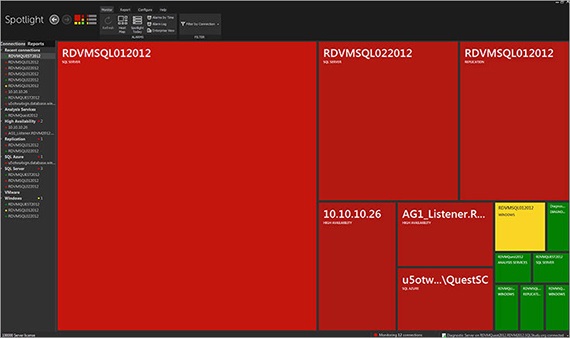
Spotlight® on SQL Server Enterprise提供深入的物理、云计算和虚拟SQL诊断。 直观地掌握企业的运行状态和性能、自动警报和操作以及集成式Xpert优化模块,能够保证您的SQL Server、分析服务、VMware ESX和SQL Azure数据库环境始终保持最佳性能。 Spotlight能够让您:

  • 对SQL Server架构的运行状况一目了然
  • 通过一个控制台监控SQL Server的关系引擎、分析服务、Windows、VMware ESX和SQL Azure
  • 自定义内置指标和警报设置
  • 实现性能指标分析自动化
  • 快速解决各种问题,包括长时间运行的进程、阻塞锁、死锁等

  • Project Lucy集成——利用Project Lucy获得免费性能分析,还可与其他用户比较使用体验。
  • VMware内存诊断——利用与虚拟CPU分析所使用的相似图表来分析虚拟内存
  • Top SQL和实时查询计划——根据索引使用率、资源消耗或查询效率精确查找SQL关键语句,并审核运行时间查询计划。
  • 高可用性支持——获得有关您的SQL Server群集、复制、数据库镜像以及日志传送活动和环境等方面深层次的信息。
  • 深度诊断——自动化诊断和解决CPU、输入或输出性能问题。
  • 自定义性能计数器——根据具体的服务等级对进程进行跟踪和报警,如同指标计数器一样主动处理性能问题。
  • 历史回放——可查看最多两周的性能诊断信息和报警数据,以便通过任意的Spotlight管理界面解决近期的性能问题。
  • 自定义报告和趋势——利用管理和性能视图、客户端报告以及Spotlight on SQL Server Enterprise报告程序包,了解您SQL Server Enterprise的健康状况、活动和能力变化趋势。
  • SQL分析和Xpert优化——通过与Quest SQL Optimizer for SQL Server(附赠Spotlight on SQL Server Xpert)进行整合,暴露长时间运行的查询和恶意代码,并调整、评估及审核索引策略。
  • Spotlight统计数据库——为历史趋势和容量规划措施配置长期的指标数据存储空间。
  • 与SQL Server Pedia集成的链接——请求专家诊断性能问题,并获得针对具体环境提供的最新建议。
  • Wait-Stat分析——诊断等待统计信息,用以确定等待发生的区域和造成等待事件的原因。
  • 死锁检测与审查——全面了解死锁事件和造成死锁的条件因素。
  • Windows专用连接视图——Spotlight视图中新增了Windows专用连接。

Spotlight Client

Before installing the Spotlight client, ensure your system meets the following minimum hardware and software requirements:

Platform1 GHz Pentium 4 PC
Memory1 GB RAM
Hard Disk Space200 MB
This space should exist on a local disk drive rather than a network drive.
Operating SystemMicrosoft Windows 2000 (Professional, Server, Advanced Server, Datacenter server) with Service Pack 4
Microsoft Windows Server 2003 (32-bit and 64-bit)
Microsoft Windows Server 2008 (32-bit and 64-bit)
Microsoft Windows Server 2008 R2 (64-bit)
Microsoft Windows XP (32-bit and 64-bit)
Microsoft Windows Vista (32-bit and 64-bit)
Microsoft Windows 7 (32-bit and 64-bit)
Additional Software
SQL Server Client Tools
To use the Discovery Wizard to locate SQL Servers on your network the SQL Server Client Tools must be installed on the Spotlight client. The SQL Server Client Tools can be found on the installation disk for Microsoft SQL Server 2000, 2005, or 2008.
Install .NET 2.0 or later
To use the Spotlight Report Viewer, .NET 2.0 or later must be installed on the Spotlight client machine.
Microsoft Internet Explorer 6.0 or later.
Microsoft Data Access Components (MDAC)
MDAC includes the ODBC and other components that enable a connection to be established to a SQL Server database. The database may be local or remote. Your client machine must have MDAC 2.7 (or later) installed.
MDAC is available from the Microsoft website: www.microsoft.com/downloads
To find out the version of MDAC that you are currently running, you can download an application from the Microsoft website called comcheck. Review the following Microsoft Knowledge Base article for more information:
http://support.microsoft.com/default.aspx?scid=kb;EN-US;3012022
Other RequirementsCD-ROM drive or Internet connection (required for installation only).
A monitor capable of supporting a resolution of 1280 x1024 or greater.

Diagnostic Server

Before installing the Diagnostic Server, ensure your system meets the following minimum hardware and software requirements:

Platform2 GHz Pentium Dual Core
Memory2 GB RAM
Hard Disk Space300 MB
If the Diagnostic Server’s connection to the Spotlight Statistics Repository or playback database is interrupted, the Diagnostic Server will cache data to the local disk. In this event, an extra 2 MB per hour, per monitored server is required.
Operating SystemMicrosoft Windows XP Service Pack 2 or later (32-bit and 64-bit)
Microsoft Windows Server 2003 (32-bit and 64-bit)
Microsoft Windows Server 2008 (32-bit and 64-bit)
Microsoft Windows Server 2008 R2 (64-bit)
Microsoft Windows 7 (32-bit and 64-bit)
Additional Software.NET 3.5 or later must be installed on the Diagnostic Server machine.
SQL Server Client Tools
To use the Discovery Wizard to locate SQL Servers on your network the SQL Server Client Tools must be installed on the Diagnostic Server. The SQL Server Client Tools are on the installation disk for Microsoft SQL Server 2000, 2005, and 2008.
To use Spotlight on Analysis Services the Client Connectivity tools must be installed.
SQL Server Management Tools
To use Spotlight on Analysis Services, Spotlight on SQL Server Replication, and Session Trace and SQL Analysis in Spotlight on SQL Server, SQL Server Management Tools must be installed on the Diagnostic Server.
The SQL Server Management Tools are available from any SQL Server 2005 or SQL Server 2008 edition except SQL Server Express and SQL Server Compact. The version required corresponds to the latest version of SQL Server that you are monitoring. Note, if you are monitoring SQL Server 2000 servers, you need the Management Tools from SQL Server 2005.

Monitoring

SQL ServerSpotlight can diagnose SQL Server instances of the following versions:
  • SQL Server 2000 (Service Pack 3 or later)
  • SQL Server 2005 (32-bit and 64-bit)
  • SQL Server 2008 (32-bit and 64-bit)
  • SQL Server 2008 R2 (32-bit and 64-bit)
  • SQL Server 2011 (Denali CTP1 and CTP2)
Spotlight on SQL Server also supports MSDE (2000), SQL Express (2005) and SQL Server 2008 Express Edition. Note that use of these versions to host playback or Spotlight Statistics Repository databases is not supported.
Spotlight cannot diagnose earlier versions of SQL Server (version 7.x and earlier).
Spotlight supports all SQL Server sort orders, including case-sensitive and binary sort orders. Spotlight cannot connect to SQL Server instances where the instance name contains non-US ASCII characters.
Database Cloud ServiceSpotlight supports SQL Azure.
Operating SystemsSpotlight can diagnose the following operating systems:
  • Microsoft Windows 2000 (Professional, Server, Advanced Server, Datacenter server) with Service Pack 4
  • Microsoft Windows Server 2003 (32-bit and 64-bit)
  • Microsoft Windows Server 2008 (32-bit and 64-bit)
  • Microsoft Windows Server 2008 R2 (64-bit)
  • Microsoft Windows XP (32-bit and 64-bit)
  • Microsoft Windows Vista (32-bit and 64-bit)
  • Microsoft Windows 7 (32-bit and 64-bit)
Note: On each monitored instance, Spotlight requires the network setting "File and Print Sharing" to be enabled and any firewall to be configured to:
  • open port 1434 for UDP packets
  • open the SQL Server TCP port (default is 1433)
VirtualizationSpotlight on SQL Server can monitor virtual guest machines in a VMware ESX infrastructure. The following versions are supported:
  • VMware vCenter 2.5 (or later)
  • VMware ESX Server 4.0 (or later)
Connection LimitThis version of Spotlight on SQL Server is designed to monitor a maximum of 100 SQL Server, Analysis Services, or Replication instances and 100 Windows servers. Monitoring more than this recommended limit may result in poor performance or product instability.

Spotlight Statistics Repository

Before installing the Spotlight Statistics Repository, ensure your system meets the following minimum requirements:

Database sizingBy default, the size of the Spotlight Statistics Repository is set to 1000MB (data size) and 250MB (log size). These sizes are flexible and can be changed by running the Spotlight Statistics Repository creation script.
The script is located in the install directory as follows:
..\Plug-ins\Diagnostics Server\Scripts
Hard Disk SpaceApproximately 1.2 GB for each monitored SQL Server instance and the corresponding monitored Windows host on which the SQL Server instance resides.
This estimate assumes default configuration in an average environment. Actual space used will depend on your environment and any data collection/storage configuration changes that are made. For more information, see the Spotlight on SQL Server Sizing Wizard. You can access the wizard from the Spotlight Installation Center.
Recommended SQL Server versionTo use Spotlight Reporting and Trending, it is recommended that the Spotlight Statistics Repository is installed on SQL Server 2005 or SQL Server 2008.
Installing the Spotlight Statistics Repository on SQL Server 2000 can result in errors being displayed and no data being shown in some views. Installing the Spotlight Statistics Repository on SQL Server 2000 is not recommended.
Note: Due to the size of the Spotlight Statistics Repository, it is recommended that this database is not installed on a SQL Express instance.
Other RequirementsThe SQL Browser service must be running on the machine where the Spotlight Statistics Repository is installed. Alternatively you can use the host and port number of the (named) SQL Server instance you want to connect to, when creating a connection and connecting to the Spotlight Statistics Repository.
The TCP protocol must be enabled on the instance where the Spotlight Statistics Repository resides.
For more information, see the Spotlight on SQL Server Deployment Guide.
MaintenanceIt is highly recommended that regular maintenance is performed on the Spotlight Statistics Repository. The recommended maintenance plan is outlined in the online help and in the Spotlight on SQL Server Deployment Guide.

Playback Database

Before installing the playback database, ensure your system meets the following minimum requirements:

Database sizingBy default, the size of the playback database is set to 500MB (data size) and 125MB (log size).
Hard Disk SpaceRequires approximately 270 MB for each monitored SQL Server instance and the corresponding monitored Windows host on which the SQL Server instance resides.
Retains 7 days of historical data for each connection in the playback database by default. This is configurable.
Assumes default configuration in an average environment. Actual space used will depend on your environment and any data collection/storage configuration changes that are made. For more information see the Spotlight on SQL Server Sizing Wizard. You can access the wizard from the Spotlight Installation Center.
Recommended SQL Server versionDue to the size of the playback database, it is recommended that this database is not installed on a SQL Express instance.
Other RequirementsThe SQL Browser service must be running on the machine where the playback database is installed. Alternatively you can use the host and port number of the (named) SQL Server instance you want to connect to, when creating a connection and connecting to the playback database.
The TCP protocol must be enabled on the instance where the playback database resides.
For more information, see the Spotlight on SQL Server Deployment Guide.
MaintenanceIt is highly recommended that regular maintenance is performed on the playback database. The recommended maintenance plan is outlined in the online help and in the Spotlight on SQL Server Deployment Guide.


Language Supported:

  • US English
屏幕截图2 屏幕截图3 屏幕截图4 屏幕截图5 屏幕截图6 屏幕截图7屏幕截图8

白皮书

Automating DBA Processes for Microsoft SQL Server Collision Course or Prime Opportunity: Virtualization and SQL Server Developing Something for Nothing with SQL Server: A Closer Look at SQL Server Express and How it Can Work for You Finding and Fixing Bad SQL in Microsoft SQL Server 2000 Foolproof Upgrades for SQL Server 2005 Get in the Groove with SQL Server Consolidation How to Use SQL Server’s Extended Events and Notifications to Proactively Resolve Performance Issues IT Consolidation for the Public Sector: How to Achieve IT Optimization Key Methods for Managing Complex Database Environments Making Sense of your SQL Server Application’s Performance – A Practical Guide Microsoft T-SQL Performance Tuning Part 1: Analyzing and Optimizing T-SQL Query Performance on Microsoft SQL Server using SET and DBCC Microsoft T-SQL Performance Tuning Part 2: Analyzing and Optimizing T-SQL Query Performance on Microsoft SQL Server using Indexing Strategies Microsoft T-SQL Performance Tuning Part 3: Analyzing and Optimizing T-SQL Query Performance on Microsoft SQL Server using Query Optimizer Strategies Microsoft T-SQL Performance Tuning Part 4: Analyzing and Optimizing T-SQL Query Performance on Microsoft SQL Server using SHOWPLAN Output and Analysis Performance Baselining, Benchmarking, and Monitoring for SQL Server 2000 Proactive Performance Management for Enterprise Databases Query Tuning Strategies for Microsoft® SQL Server® SQL Server and SharePoint - The More You Know, the Better Off You Are SQL Server Contention Diagnosing and Resolving Blocking Problems Ten Things DBAs Need to Know About Storage The Evolution of the SQL Server DBA The Top 10 Mistakes on SQL Server Top 10 Tips for Optimizing SQL Server Performance Top Ten Things You Should Know About Optimizing SQL Server Performance Worth the Wait: Why SQL Server 2008 Is Great 返回页首

案例分析

Bon Secours Hospital Resolves Performance Issues and Reduces Report Time by 80 Percent with Quest Central® for SQL Server Colorado Springs Implements Foglight to Monitor its Many Applications and Solve Problems More Efficiently Data Technology Consultants Relies on Quest Tools to Proactively Monitor Client Environments and Provide Backup Compression and Encryption Debenhams Depends on Quest's Spotlight and Foglight to Dramatically Improve System Performance and Availability Fulton County School System Sees Future of Student Information System with Quest Software's LiteSpeed Markel Gains Confidence Moving from Oracle to SQL Server with Quest’s SQL Server Performance Health Check Quest Cleans Up Greenstar's SQL Server Performance Monitoring and Delivers Diagnostics Times Savings of 80% Quest Delivers Immediate ROI and Prevents Costly Upgrade for Morefield Communications Quest Tools Ensure Peak SQL Server Performance for the City of Colorado Springs Quest’s SQL Server Performance Monitoring Nets ESOS an 80 Percent Savings in DBA Time SAIF Reduces SQL Server Problem Resolution Time by 87 Percent with Foglight Performance Analysis and Spotlight on SQL Server Enterprise SD Worx Discovers that Quest Solutions Work to Resolve Application Issues in Record Time Singapore American School Achieves a Quantum Leap in Productivity with Quest's SharePoint and SQL Server Solutions SNC-Lavalin ProFac Leverages Spotlight on SQL Server to Detect, Diagnose and Resolve Performance Issues Spotlight Eliminates the Need for Shoreline Communications to Spend $100K in System Improvements Spotlight on SQL Server Enterprise Helps LA Weight Loss to Shape Up SQL Server Performance Temporary Employment Agency Adecco Monitors its Databases with Spotlight on SQL Server and Increases the Performance of its ERP System with Performance Analysis for SQL Server Wilbur Smith Associates Is on the Road to Success with Quest's Solutions for SQL Server 返回页首