QuestDrive
试试Quest推出的MessageStats,看看它提供的一体化解决方案可如何减少电子邮件报告和分析的复杂性。
立即试用 »
迁移前指导
为您即将开始的电子邮件迁移做好准备。Quest迁移评估工具可为您提供
平台间的横向对比,
向您显示您
需要迁移的内容。您可以随心所欲地
使用此功能——完全免费!
立即试用 »
加入通信社区
立即加入通信社区,与用户及业界专家进行一对一式的交流,汲取他们的知识和经验。
马上开始 »

MessageStats

通信报告与分析工具

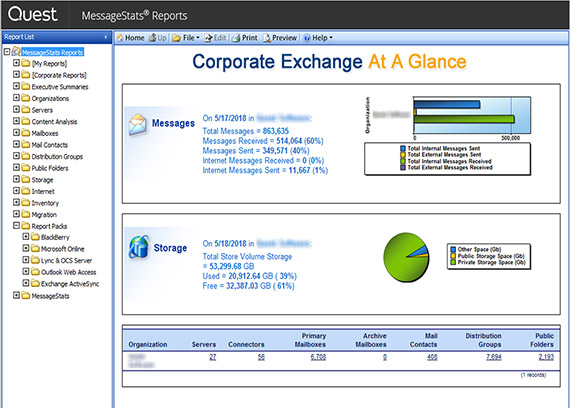
Quest MessageStats提供一体化解决方案,可在新旧平台中减少电子邮件报告与分析的复杂性。 每天都有数千家企业和机构通过一个适用于Microsoft ExchangeOCSLync Server 2010、Microsoft Online (BPOS and Office 365)、OWAWindows Mobile黑莓Sendmail/PostfixQuest Archive Manager的单独界面,使用MessageStats来了解这些环境的重要情况。 该信息可帮助他们大幅提升运营效率,保持顶级通信性能,履行服务水平协议,简化迁移过程并满足规范要求。

  • 新平台智能报告——帮助证实平台投资的合理性,收集有关Office Communications Server/Lync Server趋势的情报,从而了解电子邮件、移动设备、即时通信、视听会议和VoIP的使用情况。
  • 迁移更快,压力更小:通过在迁移之前分析现有通信环境,识别不足和缺陷,同时收集重要信息以帮助规划和构建新环境,从而加快迁移速度,降低迁移费用。 
  • Exchange及更多——借助于一个解决方案和一个“统一管理平台”,收集有关您的整个通信基础架构的信息,包括Exchange BlackBerry、OCS/Lync Server、OWA、Windows Mobile/Active Sync等。 
  • 履行服务水平协议:通过提供有关交付时间、资源使用、容量、存储、定额、已审核的邮箱或域、通讯组列表、公共文件夹等方面的摘要和详细数据,向管理层证实已达到服务水平协议(SLA)的要求。
  • 审核、合规与安全:通过针对特定的管理规范提供内部监控报告,加快审核流程,并为业务经理、管理员、法务和人事人员提供适当的访问权限。
  • 跟踪和预测存储量增长:对现有环境进行盘存,协助对未来升级进行规划。
  • 可自定义的综合概览仪表板:通过一个包含400多个MessageStats组件的数据库创建综合报表。
  • 快速部署:即使在大型的分散型企业中仍能轻松地安装和部署,实现无影响、无风险运营。 无需客户安装。
  • 自动分发报告:每日、每周、每月或每季向移动设备、网站、FTP地址和共享网络发送报告。

MessageStats Minimum Hardware Requirements

 
ProcessorPentium 4, running at a minimum speed of 2.4 GHz
Memory2 GB
Hard Disk Space250 MB of free disk space for the application.
This space should exist on a local disk drive rather than a network drive. The space requirement varies depending on the size of the database.
Note: If you are migrating an existing database, the free disk space requirement is larger than 250 MB. The space requirement varies, depending on the size of the database. If you are upgrading an existing database, the free disk space must be larger than for a new database. Space requirements also depend on the amount of information you write to the database and the length of time you retain the records.
Note: For help in assessing the amount of space sufficient for your implementation, contact Quest Support to acquire a database size estimation tool. To tune your MessageStats database and maximize performance, contact Quest Software Professional Services. You can contact Professional Services through your Quest sales representative.
OtherSufficient space for the temporary tracking log cache, application logs, and task documents. The size of this cache depends on the number of servers, the number of tracking logs on each server, and the size of each tracking log. The space should exist on a local disk drive rather than a network drive.
Monitor supporting a resolution of 1024x768 pixels.
Pointing device. You must have a pointing device installed on your computer to access all MessageStats features.
 

MessageStats Minimum Software Requirements

 
Operating SystemOne of the following:
  • Windows Server 2003 (SP2) or Windows Server 2003 R2 (SP2)
  • Windows Server 2008 or Windows Server 2008 R2

Note: MessageStats supports full installation on Microsoft Windows XP Professional SP 2, Microsoft Vista SP1, or Windows 7 only for evaluation scenarios. To use Windows XP SP 2, you must open port 80 so that MessageStats can provide access to subscription links. Microsoft Vista and Windows 7 require the same configuration as for Windows Server 2008. You can install only the MessageStats client console on Windows XP, Windows Vista, or Windows 7 in production environments.

Note: If you are hosting reports that contain Chinese, Japanese, or Korean characters, you must install the East Asian language pack if the computer that hosts MessageStats Reports is installed on Windows Server 2003. You must also install the language pack on any computer to be used to view these reports.
MessageStats Database ServerSQL Server 2005 (SP 4), SQL Server 2008 (SP 2), or SQL Server 2008 R2.
MessageStats supports SQL Server Express in test or evaluation scenarios only.

Note: SQL Server Agent must be running to use the Database Management tasks: database reindexing, defragmenting, or database aging. SQL Express does not include the SQL Server Agent. Database Maintenance tasks are not available when running on SQL Express.

MMC ConsoleFor the Database Management feature, SQL Distributed Management Objects (SQL-DMO) must be installed on the server that hosts the MessageStats MMC console.  
The SQL-DMO component is part of the Microsoft SQL Server 2005 Backward Compatibility package. You can download the SQL Server 2005 Backward Compatibility package from the Microsoft SQL Server 2005 or the SQL Server 2008 Feature Packs: SQL Server 2005 Feature Pack (December 2008) and SQL Server 2008 Feature Pack (October 2008) .
 -OR-
SQL 2005 Client Tools
For SQL Server 2005, SQL 2005 Client Tools are needed for the MessageStats Database Management feature to function in a distributed installation environment.
MessageStats Reports ServerIIS 6.0 or later.

For Windows Server 2008, IIS 7.0 is required. There are also certain IIS role services that must be enabled. See the section titled "IIS Role Services on Windows Server 2008" in the MessageStats Quick Start Guide for more information.
.Net Microsoft .Net Framework 2.0, 3.0, or 3.5. For information about resolving common ASP.NET configuration problems, see “Appendix A: Microsoft ASP.NET Configuration Issues” in the MessageStats Administrator Guide.   Note: If you have Microsoft .Net Framework 4.0 installed, you must also have .NET 2.0, 3.0, or 3.5 installed side-by-side.
BrowserInternet Explorer 7.0 or later.
DocumentationAcrobat Reader 7.0 or higher is required to access the Administrator Guide, Reports User Guide, and Quick Start Guide PDF documents.
 

Exchange-Specific Requirements for MessageStats Components

The following requirements must be met to use MessageStats in a Microsoft Exchange environment. You must install the prerequisites on the server which hosts the specified MessageStats component:

Microsoft Exchange Minimum Requirements

Task Execution Server

(task processors)

MAPI

For Exchange 2003 and earlier, Exchange Systems Manager (ESM) 2000 SP 3 or Exchange System Manager (ESM) 2003 SP 2 is required.

For Exchange 2007 or 2010, you can install the Microsoft MAPI & CDO software download: (http://www.microsoft.com/downloads/details.aspx?familyid=E17E7F31-079A-43A9-BFF2-0A110307611E&displaylang=en ) as their MAPI subsystem provider. This software must be installed wherever ESM would have been installed.

For Exchange 2010, ensure that you are using MAPI & CDO version 6.5.8153.0 or later. If you already have a version of the MAPI Download installed, you must remove it before installing the new version. The Microsoft MAPI installer does not upgrade, nor does it warn you if you try to install MAPI & CDO without removing the previous version.  

Microsoft PowerShell 2.0

For Exchange 2010, you must also install Microsoft PowerShell 2.0 on the servers that host the MessageStats task processors.  

You can download the Windows Management Framework (which includes PowerShell 2.0) from http://support.microsoft.com/kb/968929.

To see the presence status information in Exchange mailbox-specific reports, the person viewing the reports must have Office Communicator 2005 or later installed, configured, and running. Microsoft Office Outlook 2003 later must be installed.

The Exchange organization must have Microsoft Live Communication Server 2005 or later configured and running.

ExchangeAt least one server running Exchange 2000, 2003, 2007, or 2010 with tracking logs enabled and the tracking log folder shared.
 

Exchange-Specific Rights and Permissions

For information about the rights and permissions that are required to install MessageStats, to access the MessageStats database, to gather information from the Microsoft Exchange messaging environment, and to run the MessageStats service, see the MessageStats Quick Start Guide.

Exchange Server Configuration

For information about any configuration that must be done on the Exchange server to allow MessageStats to gather information from it, see the MessageStats Quick Start Guide.

Language Supported:

  • US English
屏幕截图2 屏幕截图3 屏幕截图4 屏幕截图5

案例分析

CNF Uses MessageStats and Spotlight on Exchange Essar Ensures Compliance While Reducing Administrative Staff by 50 Percent Hexaware Spends 40-50% Less Time on Message Reports with MessageStats® Hexaware’s Exchange Environment is Under Control with Quest MessageStats and Spotlight on Messaging Leading Asian Downstream Oil Logistics Company Uses Quest Archive Manager and MessageStats™ Logica Uses MessageStats for Systems Integration and Outsourcing Consultancy Microsoft Exchange Soars at The Phoenix Quest Ensures that Imperial Tobacco's Exchange 2003 Deployment Doesn't Go Up in Smoke, and Delivers ROI of Up to 500 Percent Quest Improves the Efficiency and Security of La Caja De Canarias' Operations and Customer Transactions Quest MessageStats Allows Pusan Bank to Plan for More Cost-Effective E-Mail System Growth Quest MessageStats Helps Marico Ltd. Effectively Manage its Complex Microsoft Office Communications Server 2007 Environment Quest Provides Ministry Health Care the Right Prescription for an Efficient, Cost-Effective Migration Quest Satisfies Delta Holding's Appetite for Proactive Windows Management Quest Saves SEPA Significant Time and Money by Automating its Migration to Exchange 2003 Quest’s MessageStats Drives Greater Workforce Productivity at a Software Vendor by Reducing Personal E-mail Usage by 50% Quest’s MessageStats Drives Greater Workforce Productivity at Phoenix Software by Reducing Personal E-mail Usage by 50% Quest's Windows Management Products Fit the Bill at Lancashire Constabulary SHI Uses MessageStats for Better Visibility Into Its Messaging Environment U.S. Army Europe Drives Defense Transformation Program With Quest Software's Microsoft Windows And Migration Tools University Hospitals of Leicester Enjoys a Simplified Exchange Migration and Continues to Save Money with MessageStats 返回页首