-
Resources
- Forums
-

Security Explorer
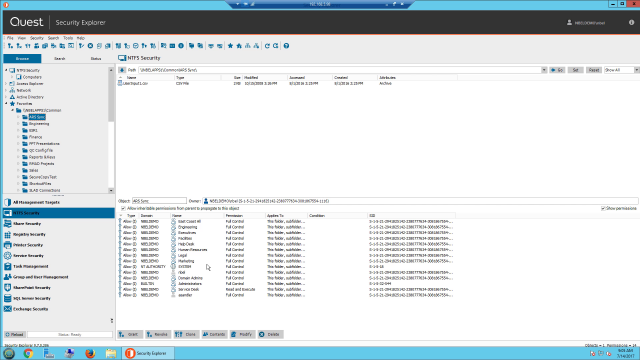
Microsoft server access control management from a single platform. Imagine having centralized access control management from a single platform. With Security Explorer®, you can manage access controls, permissions and security in real time across your various Microsoft platforms, including Active Directory (AD), Windows Server, Exchange Server, SharePoint Server and SQL Server — all from a single console.
Security Explorer® provides an array of security enhancements, including the ability to identify who has rights to resources across the entire organization. You can also grant, revoke, clone, modify and overwrite permissions quickly and from a central location.
- Search Microsoft servers to see who has rights to resources enterprise-wide
- Manage permissions across Microsoft servers from a central, unified console
- Back up, baseline and restore security and permissions, all while retaining data integrity
- Report on who has access to what to streamline security audits
 04:21
04:21
Features
Enterprise–wide rights review
Centralized permissions management
Enterprise Reporter Suite integration
Advanced security and permissions
Complete reporting
Intuitive access controls
Tour
Overview
Specifications
- Processor
Pentium 600MHz or faster
- Operating systems
Windows 8.1, Windows 10, Windows Server 2012, Windows Server 2012 R2, Windows Server 2016
- Disk Space
150MB
- Memory (RAM)
1GB
- Software requirements
.Net Framework v.4.0 or later
NOTE: Install either the Full or Standalone version. Do not install just the Client Profile.
- SQL Security
SQL Server 2019, SQL Server® 2017, SQL Server 2017 Reporting Services, SQL Server 2016, SQL Server 2014, SQL Server 2012
- SharePoint Security
SharePoint 2019, SharePoint® 2016, SharePoint 2013, SharePoint 2010, SharePoint Foundation
- Exchange Security
Exchange 2019, Exchange 2016, Exchange 2013, Exchange 2010
- Active Directory Security
Windows Server 2019, Windows Server® 2016 Functional Level, Windows Server 2012 R2 Functional Level, Windows Server 2012 Functional Level
To see the full list of system requirements please visit the support page